Bug #22024
closedImproving site creating error text/flow
0%
Description
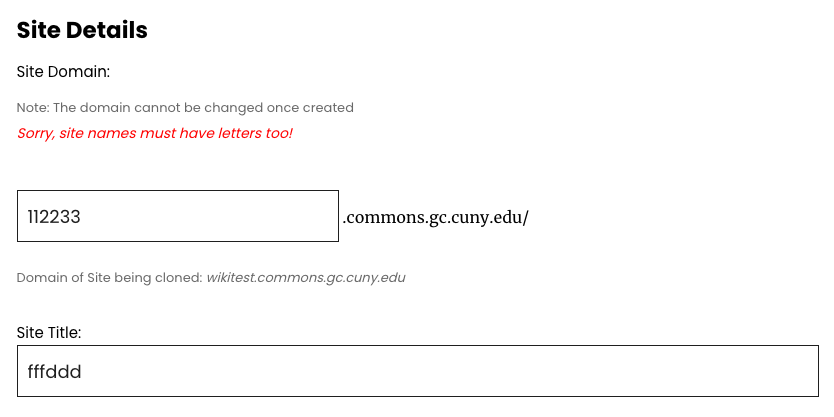
This is minor, but it was frustrating for me when I just discovered it, so perhaps it will save others down the road. When creating a site, if you put only numbers in the domain, it throws an error when trying to proceed that says:
Sorry, site names must have letters too!
That should say "site domains" instead I think, to avoid confusion with the Site Title. See attached screenshot.
It is more frustrating if you're trying to clone a site and this happens, because when the error gets thrown, it takes you back to the "Create a New Site" radio button at the top instead of the "Clone an Existing Site" radio button, and all the work you just did inputting your clone's new info is lost.
Can we make sure that your place and information is saved when an error is thrown? See attached screencast video. I thought this might also be the case for other kinds of errors, making it less of an edge case than the domain numbers example.
Files
Updated by Boone Gorges over 1 year ago
- Assignee changed from Boone Gorges to Jeremy Felt
- Target version set to 2.6.0
Jeremy, could you please have a look? The text change is minor. The more complex bit is prefilling form fields in case of a failed submission. I figured maybe you'd be best to look at this, since you built a good bit of this cloning interface.
Updated by Jeremy Felt about 1 year ago
As I started digging into this, I had another thought... why not allow numeric domain names?
The current restriction (I believe) is most important in a subdirectory multisite configuration. (e.g. something like 2025 conflicting with a date-based archive on the main site). There shouldn't be any restriction in DNS or elsewhere in WordPress that prevents numeric domains.
So, question for the group: should we allow fully numeric subdomains?
(And whether or not we change that, there are also other "site name" error messages that we can adjust to reflect "domain")
Updated by Colin McDonald about 1 year ago
If it's just an issue of lifting the numeric ban, and it doesn't take more resources, I don't see why we should prevent the numeric subdomains. It's an edge case for sure, though.
Jeremy, let me know if I can help adjust the other "site name" error messages that you mention. I'm not sure what all of the defaults are right now.
Updated by Jeremy Felt about 1 year ago
Here are instances where "site name" may be shown as part of the error. I think we can replace each with "subdomain".
- "Please enter a site name", when no subdomain has been entered
- "Site names can only contain lowercase letters (a-z) and numbers." when a subdomain has non-alphanumeric characters.
- "That name is not allowed." when a subdomain matches the list of "illegal" names.
- "Site name must be at least 4 characters." when a subdomain has fewer than 4 characters.
- "Sorry, site names must have letters too!" when the subdomain is numeric only.
And I think Boone has solved the other part of this ticket in the new batched cloning interface. The error now appears at the bottom and the entire form is not wiped out.
Updated by Colin McDonald about 1 year ago
Thanks Jeremy, and that looks good to be about all of the "site name" for "subdomain" substitutions. Let's move ahead with that when you can.
Updated by Jeremy Felt about 1 year ago
I've updated the error messages that reference site name to use subdomain instead in https://github.com/cuny-academic-commons/cac/commit/82545f117a3559cbc569e17a7739b6849cd35112
Updated by Boone Gorges 12 months ago
- Status changed from New to Staged for Production Release
Updated by Boone Gorges 11 months ago
- Status changed from Staged for Production Release to Resolved
Updated by Colin McDonald 11 months ago
I just checked on production, and I don't think this is deployed there yet. Can we add it to the next maintenance release?
Updated by Boone Gorges 11 months ago
- File Screenshot_2025-11-11_11-10-15.png Screenshot_2025-11-11_11-10-15.png added
- File Screenshot_2025-11-11_11-10-05.png Screenshot_2025-11-11_11-10-05.png added
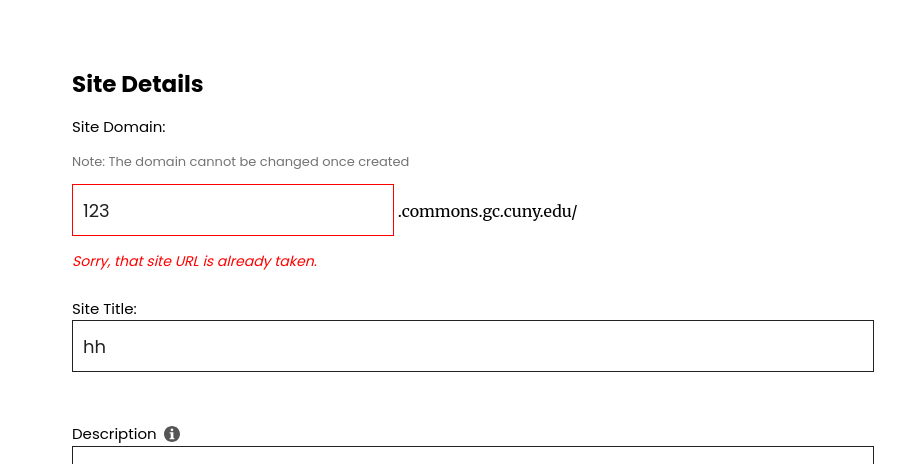
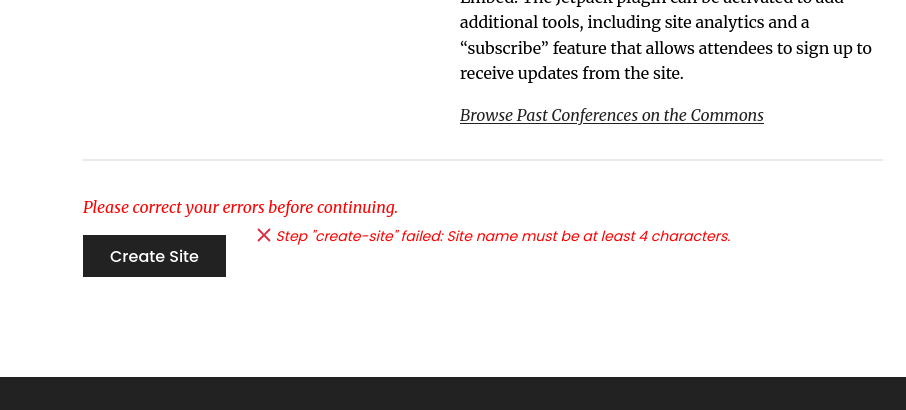
In my tests, the generic error message is appearing at the bottom of the form, but not directly under the field. Colin, is that what you mean? If so, the issue is not a failure to deploy, it's that the upper message is generated in a different way.
Updated by Colin McDonald 11 months ago
Yes Boone, that's what I mean, thanks for clarifying. I tried to hit Create without putting anything in the subdomain field and saw what's in your second screenshot. I expected that message at the bottom to say, "Please enter a subdomain" as per the message list above. I think it would also be good if there was an upper message generated for this, like what happens in your second screenshot if you enter a "taken" subdomain, but maybe that isn't essential.
Updated by Boone Gorges 11 months ago
Thanks, Colin. But I'm afraid I still don't fully understand your report. I think the use of the word "bottom" is confused. Use "bottom" to refer to what you see next to the 'Create Site' button. Use "top" to refer to the message you see just under the subdomain field. I'm suggesting that the bottom message is correct, but not the top. Can you confirm this? Or is the bottom one sometimes incorrect too? If so, in exactly what case?
Updated by Colin McDonald 11 months ago
Sorry, Boone. Using your definitions, I am talking about what you get at the bottom if you don't enter anything in the "Site Domain:" field. It then says, "Step "create-site" failed: Please enter a site name." when it should say, "Step "create-site" failed: Please enter a site subdomain."
The site name and subdomain are two different things and two different fields, so it seems to me that the error message should be different and specify which is missing or incomplete.
I don't see any message at the top if I fill out all other fields except Site Domain: and hit Create. I was saying before that it might be good to have a message at the top, for Site Domain:, if you enter nothing and need to enter something. So this would be similar to the top message in your screenshot that appears when a chosen domain is already taken, but instead it could say, "Please enter a site subdomain." But I think we can skip this if others disagree or it's a hassle, as long as you get the same message at the bottom.
Updated by Boone Gorges 11 months ago
- Status changed from Resolved to Staged for Production Release
- Target version changed from 2.6.0 to 2.6.2
I've made two changes:
1. In https://github.com/cuny-academic-commons/cac/commit/53fecb7932b38a87425789783115960826ba5a5d, I fixed an issue that prevented Jeremy's string-swapping trick from working properly when WP's wpmu_validate_blog_signup returns an array of error strings. This fixes the issue in the "bottom" section when you don't enter any value in the URL field (since there are multiple failure points).
2. In https://github.com/cuny-academic-commons/cac/commit/0ac9c4c8d5b8b41f2cd1ac32a837bbe9e385d267, I modified the AJAX-powered validation string that appears underneath the URL field ("top") so that it uses the very same validation routine, and thus the same error strings, as the form-level validation errors at the bottom of the page. This should make them consistent.
This will be part of the 2.6.2 release.
Updated by Colin McDonald 11 months ago
Thanks very much for these changes, Boone!
Updated by Boone Gorges 11 months ago
- Status changed from Staged for Production Release to Resolved