Support #24417
closedstatue privately published?
0%
Description
Via Keeping, Lesley Broder writes :
I am having trouble making my post visible here at this link - https://intrepid.commons.gc.cuny.edu/bridging-qualitative-quantitative-research/. Each time I change it to "public" and save, it reverts to "private." Any help would be appreciated!
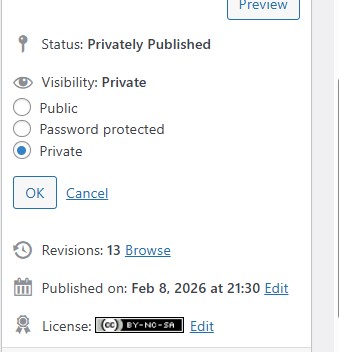
I've tried to change it and see exactly what she means. The Visibility preference reverts back to Private. Scott took a look as well. Today I noticed that the status is privately published. What is that? I assume it's what's causing this but haven't seen it before.
Files
Updated by Raymond Hoh 8 months ago
The issue was the "CAC Private Visibility Default" plugin was activated. This forces all posts to be private even if the author attempts to set their post to Public. I've just deactivated the plugin and set the post in question to Public.
I think we might need to add some messaging when this plugin is activated so users will not be confused. Either that or hide the Status and Visibility options in the Publish options section of the Edit Post screen.
Updated by Raymond Hoh 8 months ago
- Category name set to WordPress Plugins
- Assignee set to Jeremy Felt
The "CAC Private Visibility Default" plugin was introduced in #19627.
Jeremy and Boone, it looks like the "CAC Private Visibility Default" plugin is meant primarily for the Block Editor, but when the Classic Editor is toggled by the user, the plugin forces the post to Private without any additional options or messaging in the Publish metabox.
It appears that we need to write a bit of JS on the Classic Editor's "New Post" screen to toggle the Visibility option to Private and the set_default_visibility() function will need to be tweaked a bit. Does that seem right?
Updated by Marilyn Weber 8 months ago
BTW, I asked if they turned this on intentionally but they aren't sure as they've had a webmaster who left
Updated by Boone Gorges 8 months ago
- Status changed from New to Staged for Production Release
- Target version set to 2.6.7
Thanks for debugging this, Ray. I've made a small addition to the cac-private-visibility-default plugin so that, on Classic, the regular post-visibility radio defaults to 'public'. (We can skip all the REST juggling in the case of Classic.)
https://github.com/cuny-academic-commons/cac/commit/8895f64d14e34a4267ac955a1a8730e166926a1c
https://github.com/cuny-academic-commons/cac/commit/88a5a93714d3f36f0c4d06a4e90081b52676265b
Updated by Jeremy Felt 8 months ago
I made a couple more tweaks in https://github.com/cuny-academic-commons/cac/commit/cf2e96b4f45a32e8d852538727334490505b263c
When editing a post that existed before the plugin was activated in the classic editor, it would be set to private unintentionally.
Also, our assets were enqueuing on non-post post types, which was confusing, because it wasn't really applying to those.
I've tested these scenarios and all should work now:
1. New post in block editor
2. Existing post in block editor
3. New post in classic editor
4. Existing post in classic editor
5. Block editor post edited in classic editor
6. Classic editor power edited in block editor
Updated by Boone Gorges 8 months ago
- Status changed from Staged for Production Release to Resolved