Support #24632
closed
File Blocks cut off at bottom of page in Bravada
Added by Marilyn Weber 7 months ago.
Updated 7 months ago.
Category name:
WordPress Themes
Description
Syelle Graves writes:
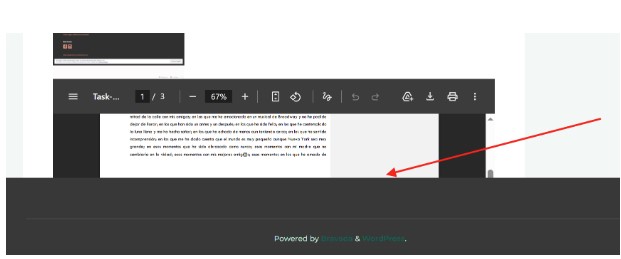
"I don't know if it's related to the author issue that Boone just fixed, but file blocks are chopped off in my view, in both pages and posts, when they're at the bottom, in the same Bravada theme site, edge and Firefox https://textbasedtasks.commons.gc.cuny.edu/1471-2/
We're embedding pdfs for now, but it would be great if we could get file blocks to show."
Screenshot attached
Files
- Category name set to WordPress Themes
- Status changed from New to Reporter Feedback
- Target version set to Not tracked
This is unrelated to the previous issue #24595 but it is a bug in Bravada. I've opened a ticket in https://wordpress.org/support/topic/wp-file-block-and-other-embeds-are-cut-off-due-to-fitvids-technique/#new-topic-0 with a suggested fix.
As a temporary workaround, I've put some style rules in place (Dashboard > Customize > Additional CSS) that force the correct positioning:
.fluid-width-video-wrapper > object.wp-block-file__embed,
.fluid-width-video-wrapper > embed.wp-block-file__embed {
    position: static !important;
    top: auto !important;
    left: auto !important;
    width: 100% !important;
    height: 600px !important;
}

.fluid-width-video-wrapper:has(> object.wp-block-file__embed),
.fluid-width-video-wrapper:has(> embed.wp-block-file__embed) {
    padding-top: 0 !important;
    height: auto !important;
}
Syelle reports "Thanks so much, Boone. It's working perfectly for me now."
- Status changed from Reporter Feedback to Resolved
Also available in: Atom
PDF