Bug #24879
closedSite icon breaks frame in new admin bar
0%
Description
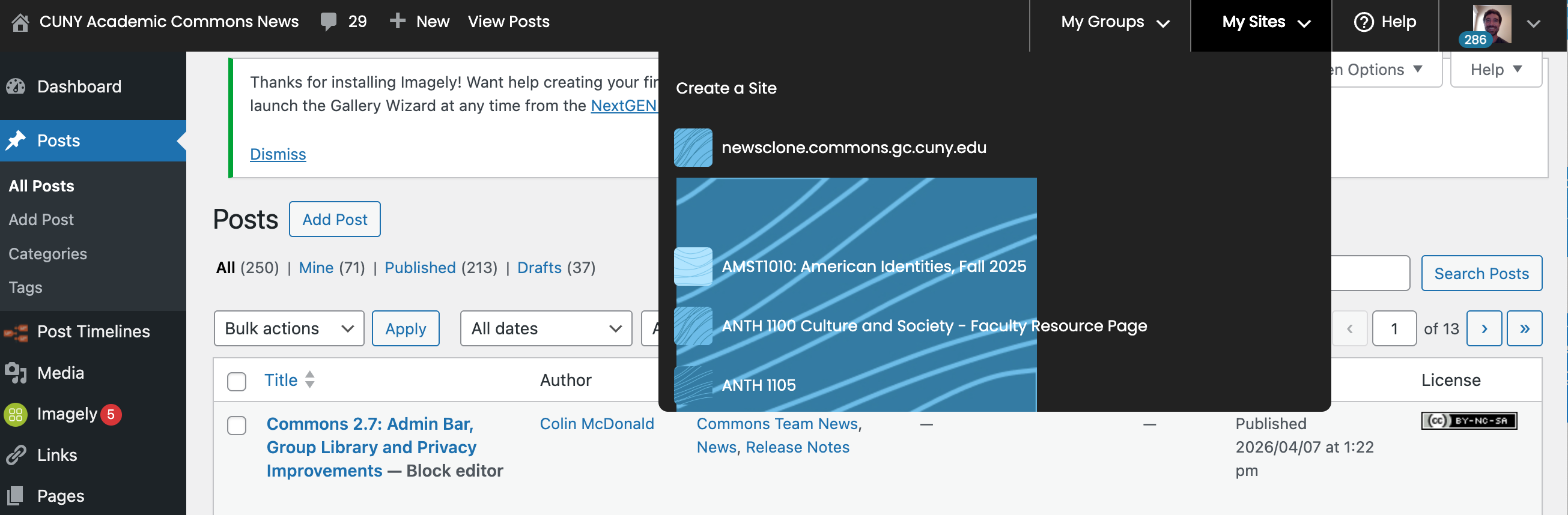
See attached screencast in an incognito window, not sure what's happening here. This is the site that is covered up by the icon overflow. Maybe something is off in its settings or theme?
Files
Updated by Colin McDonald 6 months ago
- File sites-admin-icon-2.mov sites-admin-icon-2.mov added
Quick followup and second attachment, didn't realize this overflow icon issue is down the whole menu as you scroll.
Updated by Boone Gorges 6 months ago
It appears that the styling for these icons depends on the blavatar class, but some icons (locally uploaded, I think) don't have the blavatar class.
Updated by Raymond Hoh 6 months ago
- Category name set to Toolbar
- Status changed from New to Resolved
- Target version set to 2.7.2
Thanks for finding this bug, Colin.
Boone is correct that the blavatar CSS class is missing. This is due to the BP Groupblog plugin's filter overriding the site icon from the bp_get_site_avatar() function. When BP Groupblog overrides the site icon for group sites, it doesn't use the passed 'blavatar' class that is used in the original function call. I've added some code to manually add the 'blavatar' CSS class back in https://github.com/cuny-academic-commons/cac/commit/9443df5e4726b0059e7322dce48a89c3e4ee3a3f. Fix is also pushed to production.