Feature #25173
closedCustom post sort
Added by Laurie Hurson 4 months ago. Updated 3 months ago.
0%
Description
Hi All,
A faculty member I am supporting is working on a program site. She is building out a page that uses an Otter Block to pull categorized posts into a page to list faculty here: https://epibios.commons.gc.cuny.edu/full-time-faculty/
She is wondering if it's possible to sort by last name instead of firstname. I thought about using a custom post order plugin but I think it will be overridden by the otter block post settings. Do you all have any thoughts on if it might be possible to sort by last name on the page linked above?
Thanks!
Files
| Screenshot 2026-06-29 125106.png (94.8 KB) Screenshot 2026-06-29 125106.png | Raymond Hoh, 2026-06-29 03:53 PM | ||
| Screenshot 2026-06-30 at 9.13.18 AM.png (1.52 MB) Screenshot 2026-06-30 at 9.13.18 AM.png | Laurie Hurson, 2026-06-30 09:14 AM | ||
| Screenshot 2026-06-30 at 9.13.11 AM.png (2.18 MB) Screenshot 2026-06-30 at 9.13.11 AM.png | Laurie Hurson, 2026-06-30 09:14 AM | ||
| Screenshot_30-6-2026_92516_epibios.commons.gc.cuny.edu.jpeg (1020 KB) Screenshot_30-6-2026_92516_epibios.commons.gc.cuny.edu.jpeg | Raymond Hoh, 2026-06-30 12:51 PM | ||
| Screenshot 2026-07-01 015550.png (57.2 KB) Screenshot 2026-07-01 015550.png | Raymond Hoh, 2026-07-01 05:01 AM |


Updated by Raymond Hoh 4 months ago
The Posts Otter Block would not work for this because the block only supports sorting by post title.
You would need to use a Posts block that supports custom post order. Fortunately, the Kadence Blocks plugin does have a Posts block that supports sorting by custom order. I've added the Posts Kadence Block to the page and have activated the Simple Custom Post Order plugin in order to easily arrange the "Full-time Faculty" category posts by last name. It doesn't look as nice as the Posts Otter Block, but let me know if the site requires any other adjustments here, Laurie.
Updated by Laurie Hurson 4 months ago
Thank you Ray- this is great and just what we needed! I will let the site admin know!
Updated by Laurie Hurson 4 months ago
Hi Ray,
Apologies for my confusion. I went to do this with the adjunct facaulty page and cannot get the posts to stay in order...
I am dragging and dropping the posts in the Dashboard posts area to organize by last name- is this not the right location to set the post order. I was not sure where else to organize based on how the Simple Custom post order plugins works.
Thanks,
laurie
Updated by Laurie Hurson 4 months ago
For more info: what I am seeing is I organize the posts into the correct order in the dashboard and it works on the front end but if i refresh the dashboard, it reverts to the old order. What am i doing wrong?
Updated by Raymond Hoh 4 months ago
Hi Laurie,
I am dragging and dropping the posts in the Dashboard posts area to organize by last name- is this not the right location to set the post order. I was not sure where else to organize based on how the Simple Custom post order plugins works.
This is correct. The Posts dashboard page is the right location to set the post order by dragging and dropping.
For more info: what I am seeing is I organize the posts into the correct order in the dashboard and it works on the front end but if i refresh the dashboard, it reverts to the old order. What am i doing wrong?
The order looks correct for me in the admin dashboard: https://epibios.commons.gc.cuny.edu/wp-admin/edit.php?category_name=adjunct-faculty
Is the order still looking incorrect on your side, Laurie?
I went to do this with the adjunct facaulty page and cannot get the posts to stay in order...
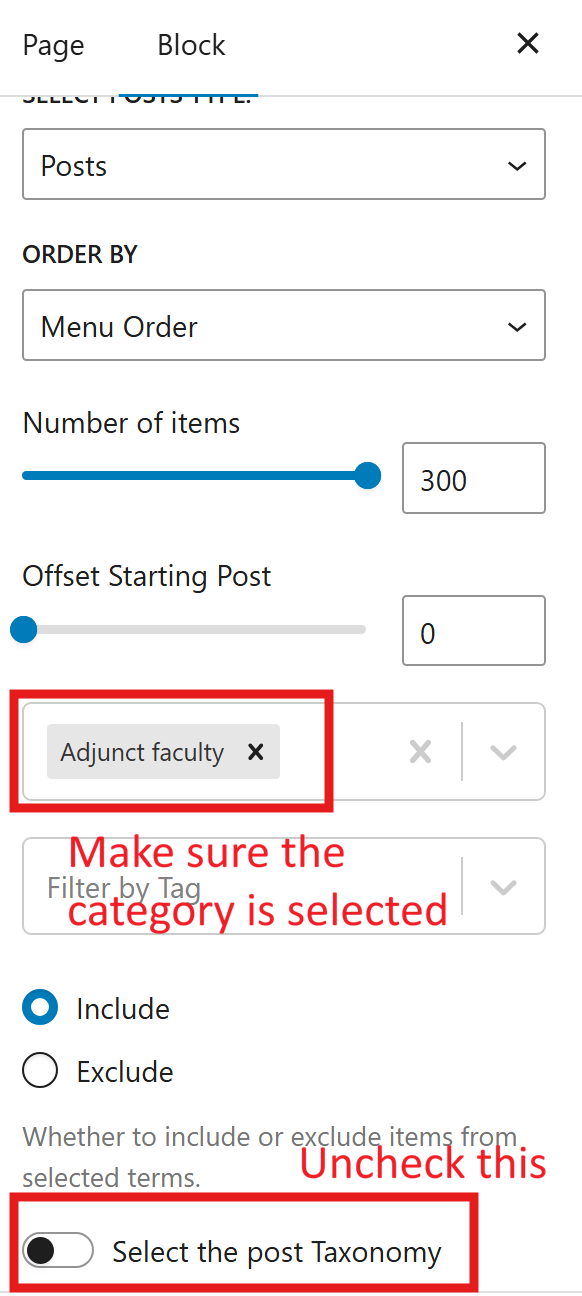
The Kadence Posts Block settings were missing the "Adjunct Faculty" category and the "Select the post taxonomy" option needed to be unchecked. See attached screenshot. Let me know if the block looks the way it should now.
Updated by Laurie Hurson 4 months ago
- File Screenshot 2026-06-30 at 9.13.11 AM.png Screenshot 2026-06-30 at 9.13.11 AM.png added
- File Screenshot 2026-06-30 at 9.13.18 AM.png Screenshot 2026-06-30 at 9.13.18 AM.png added
Hi Ray,
thanks for clarifying. It does look correct on the front end but i am confused because that order is not reflected in the dashboard post list? see screenshots. I feel like I am being particularly dense about this so I apologize!
Updated by Raymond Hoh 4 months ago
- File Screenshot_30-6-2026_92516_epibios.commons.gc.cuny.edu.jpeg Screenshot_30-6-2026_92516_epibios.commons.gc.cuny.edu.jpeg added
Hmm, not sure what is causing the order on the Posts admin dashboard page to look wrong on your side, Laurie.
I've attached a screenshot of what I'm seeing. I can try and debug the Posts admin dashboard page for your account later today to see what might be causing the issue, but I have to step out for a bit.
Updated by Raymond Hoh 4 months ago
- File Screenshot 2026-07-01 015550.png Screenshot 2026-07-01 015550.png added
- Category name set to WordPress Plugins
- Status changed from New to Staged for Production Release
- Target version set to 2.7.7
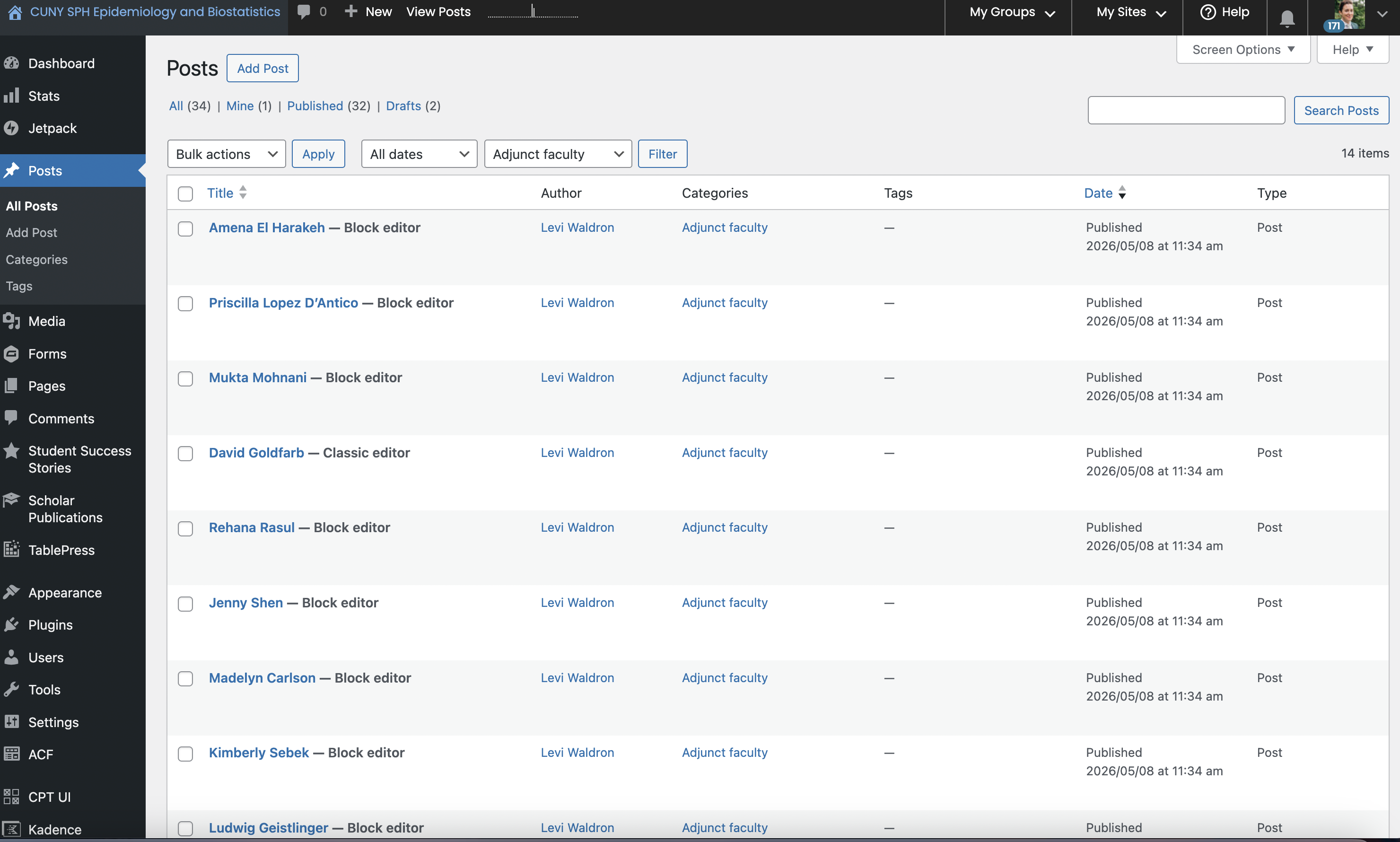
I was able to duplicate your problem, Laurie. See attached screenshot.
If you go directly to the following admin URL -- https://epibios.commons.gc.cuny.edu/wp-admin/edit.php?category_name=adjunct-faculty -- the custom sort order will work.
However, if you are using the category dropdown filter on the Posts admin dashboard page, the custom sort order will not take place. The reason why is when you use the category dropdown filter, an empty 's' parameter is added to the URL querystring in the address bar. The 's' parameter signifies that a search is made. Even if the 's' parameter is empty when you use the category dropdown filter, WordPress's is_search() function will still return true. The is_search() function is used by the Simple Custom Post Order plugin to determine whether their custom sort order should take place or not: https://github.com/cuny-academic-commons/cac/blob/6704e33b8a99c807237f4e5fed76d3c23725c66d/wp-content/plugins/simple-custom-post-order/simple-custom-post-order.php#L874-L876. So at the moment, when you use the category dropdown filter, the custom sort order will not work. I've notified the plugin author with a fix here: https://github.com/ColorlibHQ/simple-custom-post-order/pull/153.
I've also committed the fix for the next maintenance release scheduled in mid-July in https://github.com/cuny-academic-commons/cac/commit/c9decfe0d670e6987f6c73b7dbbb57987996394a, but for now, Laurie, to view the custom post order for a category, use the category link in the "Categories" posts column and do not use the "All Categories" dropdown filter.
Updated by Laurie Hurson 4 months ago
Thanks so much for looking into this Ray, and sussing out the bug. Apologies for not mentioning I was using the filter. I'll go through the route you mentioned to see the post order for now!
Updated by Boone Gorges 3 months ago
- Status changed from Staged for Production Release to Resolved