Bug #25743
openCloning Issue
0%
Description
HI All,
I was working with the Lehman Open Pedagogy Fellowship group this morning and they all experienced an issue in the cloning process. I think something about the theme or the styling is not getting moved over correctly.
The site they were all cloning: https://121test.commons.gc.cuny.edu/
The Clones:
https://eng121mccallum.commons.gc.cuny.edu/
https://eng121yasmin.commons.gc.cuny.edu/
https://121grove.commons.gc.cuny.edu/
https://eng121jerzy.commons.gc.cuny.edu/
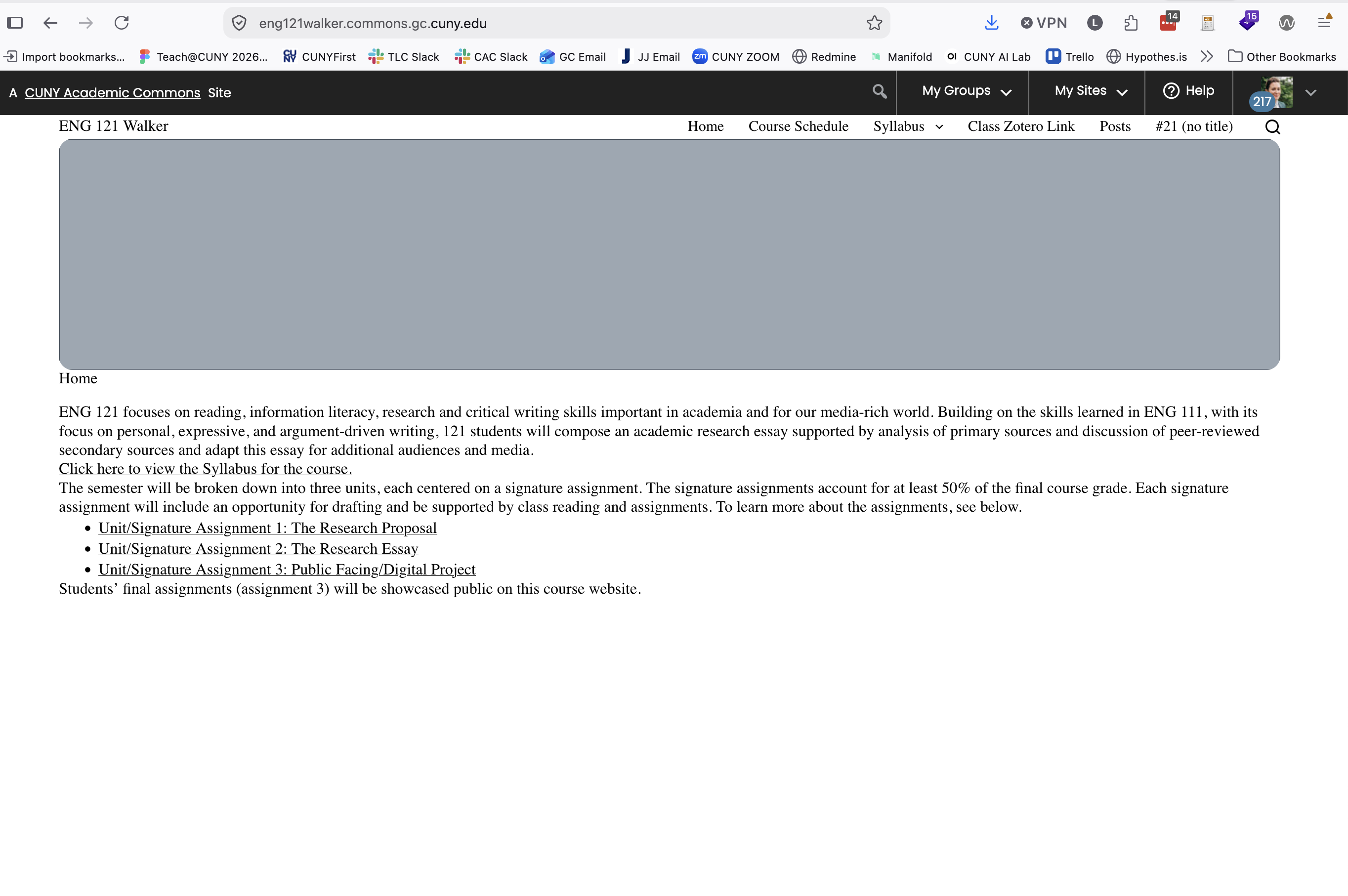
https://eng121walker.commons.gc.cuny.edu/
This site was also cloned at the same time (maybe a few mins before) and worked correctly:
https://eng123adams.commons.gc.cuny.edu/
Can you look into why the sites were not cloned correctly and possibly help resolve the styling issues on the clones that did not turn out right?
Files

Updated by Laurie Hurson 4 days ago
I think maybe this is because i used the blocksy theme and these new sites did not have it. My fault! Silly mistake...
Would the solution be to activate blocky on the sites and would this resolve the layout issues?
thanks and sorry for this!
Updated by Boone Gorges 4 days ago
It definitely has to do with Blocksy, but I'm not sure if this'll resolve it automatically. There's some sort of stylesheet that doesn't appear to have been copied over in a way that it can be read on the new site. Compare source https://s3.amazonaws.com/files.commons.gc.cuny.edu/wp-content/blogs.dir/52683/files/blocksy/css/global.css?ver=64615-2.7.12 with destination https://s3.amazonaws.com/files.commons.gc.cuny.edu/wp-content/blogs.dir/53255/files/blocksy/css/global.css?ver=46696-2.7.12; this seems to have something to do with the way that Blocksy loads its stylesheets, such that our AWS access-control tools work automatically. I'll take a closer look this afternoon.
Updated by Boone Gorges 4 days ago
I was able to track down the way that Blocksy was building the CSS URL and then ensure that it is run through the proper filters to be reachable at private S3 URLs. https://github.com/cuny-academic-commons/cac/commit/e6d06975a94f3c9ffd6829bdf6df926b63694c04
I had to make a related change to avoid double-escaping of certain characters in asset URLs. This is likely a longstanding bug that only comes up in very narrow circumstances. https://github.com/cuny-academic-commons/cac/commit/1f0474126f3d949a3c0543203d0f9c91a278a612
Laurie, these are shipped to the production site. Could you have a look?
Updated by Laurie Hurson 1 day ago
- File Screenshot 2026-09-28 at 3.52.54 PM.png Screenshot 2026-09-28 at 3.52.54 PM.png added
- File Screenshot 2026-09-28 at 3.53.11 PM.png Screenshot 2026-09-28 at 3.53.11 PM.png added
Thanks for looking into this Boone. I probably should have also mentioned that there is an extra plugin that adds on to Blocksy called "Blocksy Companion" and maybe that also needed to be available and running for the cloning to work?
Some of the sites appear fixed:
https://eng121mccallum.commons.gc.cuny.edu/
https://eng121yasmin.commons.gc.cuny.edu/
https://eng121jerzy.commons.gc.cuny.edu/
But several still do not look right:
https://eng121walker.commons.gc.cuny.edu/
https://121grove.commons.gc.cuny.edu/
Updated by Boone Gorges 1 day ago
Both of the problematic sites you referenced were cases where the S3 global.css asset hadn't been switched to 'public' status. That is, when you originally cloned the sites, they appear to have been private. Thus all of their copied S3 assets were also private. At some point these two sites were switched to public, but in such a way that at least some of the S3 assets didn't also have their 'public' flag flipped. I'm unsure that this has anything to do with the originally-reported issue, which was quite specific to the way that Blocksy loads assets. Can you say anything more about the way that you handled private/public status of these clones? It might help me to understand whether this is a one-off or whether there's a deeper bug with the way that S3 assets have their status toggled when changing the site's status.
Updated by Laurie Hurson 1 day ago
Faculty cloned the original site themselves so they chose the privacy settings of the cloned sites. So this is why there are differences across the privacy settings for the clones.
The process for this was:
1. I created the 121test site to serve as the template site. Blocksy was the theme on the 121test site.
2. Faculty joined the Commons and I invited them to be admins on the 121test site.
3. Faculty cloned the 121test site to make the site for their course. During the cloning process they selected the privacy setting of the resulting cloned site.
Updated by Raymond Hoh about 24 hours ago
I think this is related to #25754.
I believe the site cloning process uses a cronjob. However, we have a cronjob lag of six days at the moment so older items in the queue need to be completed before the site cloning ones can run.
Boone, I also think Cavalcade (our cronjob runner) is not currently running on production because I do not see the cronjob queue moving. Can you confirm?
Updated by Laurie Hurson about 6 hours ago
The two site that were still looking incorrect now do seem to be okay - the styles are rendering normally.
I also cloned the 121test site again, in the cloning processes I selected that the new site should be visible only to admins (private) as I think this is what Boone was saying was the issue on the walker and grove clones above.
In my new private clone site the styles appear to have cloned correctly: https://121teststyle.commons.gc.cuny.edu/