Documentation #24691
closedBbPress Question on post hide functionality
0%
Description
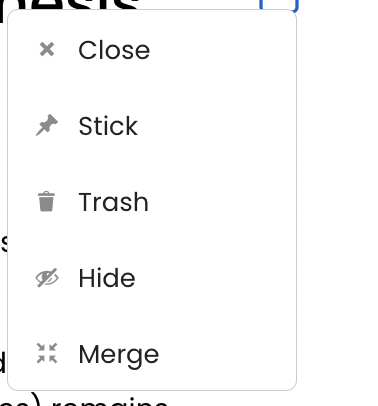
Hi Ray - can you please let me know how the "hide" feature for forum posts work? I'm the admin of a group and I'm trying to decide whether to hide or delete a post. wondering whether "hide" hides for all users or just me
screenshot attached
Scott, if you could document this after we get an answer, I would appreciate it
Files

Updated by Raymond Hoh 7 months ago
The Hide feature hides the post from view for regular group members. It is only visible to group admins and moderators.
Updated by Raymond Hoh 7 months ago
Hi Matt,
About:
FYI -- after clicking "hide" on the post from the post page (rather than the list of posts)
Can you outline the steps you did to hide the forum post? I'm trying to replicate the issue where you see the "No one in the group has posted a topic yet" message after hiding a forum post, but am not able to. I tried hiding both an entire forum topic and a singular forum post.
Updated by Raymond Hoh 7 months ago
Hi Matt, can you provide a link to the forum post you hid so I can attempt to unhide and hide the forum post to replicate the "No one posted" message?
Updated by Colin McDonald 7 months ago
Hi Ray, I believe this was the original post, and then there was a reply to that post. Matt hid both of them, or maybe just the original which also hid the reply by extension:
Updated by Raymond Hoh 7 months ago
Thanks for the link, Colin. I was able to replicate the problem locally.
Matt's hidden forum topic is missing its post slug, which is why the forum topic is no longer resolving at that permalink. The reason why the post slug is missing is due to Matt's account failing the 'publish_post' capability check when hiding the post (or in WordPress terms, marking the post status as 'pending'): https://github.com/WordPress/WordPress/blob/973e6ccec7b6cdd2b9b92f31c867883406e5ab1d/wp-includes/post.php#L4679-L4681. This check is failing because Matt's account does not have a forum role. The user accounts I was testing with already had a forum role, which is why I couldn't duplicate the bug initially.
I've just added the Participant forum role to Matt's account, so hiding forum topics should work as expected again. I've also restored the post slug for Matt's hidden topic so the hidden topic URL should resolve again as well.
Next step is to determine how we want to solve this issue broadly. Boone, the number of users on the Commons that do not have a forum role is:
> select count(user_id) from wp_usermeta where meta_key = 'wp_1_capabilities' and meta_value not like '%bbp_%';
+----------------+
| count(user_id) |
+----------------+
|          16451 |
+----------------+
1 row in set (0.110 sec)
We can add the Participant forum role to each user account that is affected and also turn back on bbPress's auto role (the '_bbp_allow_global_access' option) as it looks like this is turned off. Or we can keep bbPress's auto role off, but add a Participant forum role during account activation to the user's account on the main site.
The other thing to look at is why the current_user_can( 'publish_post' ) check is failing when a forum role is not added to a user's account as bbPress does have some capability bypass checks for group users here: https://github.com/bbpress/bbPress/blob/a1bbc121a5d4ccf4e38764398d3cfb59cac71097/src/includes/extend/buddypress/groups.php#L152-L153. That's as far as I got for now.
Updated by Raymond Hoh 7 months ago
Boone, just want to outline how to duplicate ths bug.
1. Ensure the logged-in user account does not have a forum role. (Check /wp-admin/users.php or run wp user meta get USER_LOGIN wp_1_capabilities and see if a bbPress role is not in the array.)
2. Next, make a group forum topic
3. Then attempt to Hide the forum topic using the ellipsis menu.
4. You should see the "No one in the group has posted a topic yet" message.
What happens is when a topic is hidden (put in 'pending' post status), bbPress uses the bbp_unapprove_topic() function, which cascades down to wp_update_post() and then to wp_insert_post() where I outlined the 'publish_post' cap check and post slug problem above.
If we do not want to solve this by giving all affected users the bbp_participant role, we can reinstate the post slug during topic unapproval by using the following snippet:
/**
 * Reinstates post slug when marking a forum topic as unapproved.
 *
 * This is for users that do not have a forum role.
 *
 * @see https://redmine.gc.cuny.edu/issues/24691#note-8
 */
add_filter(
    'wp_insert_post_data',
    function( $retval, $postarr, $unsanitized_postarr, $update ) {
        // Check if this is an update and whether the post is pending.
        if ( ! $update || ! isset( $postarr['post_status'] ) || 'pending' !== $postarr['post_status'] ) {
            return $retval;
        }

        // Check if post type is 'topic' and post name is wiped out.
        if ( ! isset( $postarr['post_type'] ) || 'topic' !== $postarr['post_type'] || ! isset( $postarr['ID'] ) || '' !== $retval['post_name'] ) {
            return $retval;
        }

        /*
         * If we're here, user doesn't have 'publish_post' permission because post slug is empty.
         *
         * Recreate post slug by copying some $post_name logic from wp_insert_post() below.
         */
        $post_name = $postarr['post_name'];

        // On updates, we need to check to see if it's using the old, fixed sanitization context.
        $check_name = sanitize_title( $post_name, '', 'old-save' );

        if ( strtolower( urlencode( $post_name ) ) === $check_name
            && get_post_field( 'post_name', $postarr['ID'] ) === $check_name
        ) {
            $post_name = $check_name;
        } else {
            $post_name = sanitize_title( $post_name );
        }

        $retval['post_name'] = wp_unique_post_slug( $post_name, $postarr['ID'], $retval['post_status'], $retval['post_type'], $retval['post_parent'] );
        return $retval;
    },
    10,
    4
);
The alternative approach is provisioning the 'publish_topics' cap via the 'user_has_cap' filter for those that do not have a forum role. Could probably run this cap override on the 'bbp_unapprove_topic' hook to ensure this cap check doesn't run unnecessarily. Let me know what you think.
Updated by Boone Gorges 7 months ago
Thanks, Ray - I haven't forgotten this, but I've been swamped. I'll have a closer look in the upcoming days.
Updated by Boone Gorges 6 months ago
Ray, thanks for sharing what you've found here.
Regarding "global access", it appears that we had problems previously with the use of this feature on secondary sites: #12156, #12105 I don't think that this is directly related to the current issue, since it's specific to the BP root blog. Related, I also see that we made changes related to #12336 where dynamically gave users certain bbPress caps, but this too didn't apply to the primary site https://github.com/cuny-academic-commons/cac/commit/d9443f9d13
It's very odd that unpublishing a post when you don't have 'publish_post' would result in the post being given an empty slug. But this feels too deep in the system for us to work around. I think the better path is to ensure that users have the necessary role or cap.
The alternative approach is provisioning the 'publish_topics' cap via the 'user_has_cap' filter for those that do not have a forum role. Could probably run this cap override on the 'bbp_unapprove_topic' hook to ensure this cap check doesn't run unnecessarily.
This feels like the most surgical approach to me, and the one least likely to have side-effects. You want to put together a patch for it?
Updated by Raymond Hoh 6 months ago
- Status changed from Assigned to Staged for Production Release
- Target version set to 2.7.1
This feels like the most surgical approach to me, and the one least likely to have side-effects. You want to put together a patch for it?
Done in https://github.com/cuny-academic-commons/cac/commit/680363ab6f6b15efde4f7863f44cfebcfc279780.
Updated by Boone Gorges 6 months ago
- Status changed from Staged for Production Release to Resolved