Bug #25126
openVPAT Initial Report
66%
Description
Hi All,
We received the initial report from TPGi, which I've attached here. Please look it over.
Next steps:
- we need to get our team trained on the ARC platform that TPGi uses to review issues. I think we need to wait for Boone to be back to schedule that, so it may be a few weeks
- we need to come up with a plan for addressing these issues
- once we're in the ARC platform, we can ask questions of TPGi as we go along
TPGi is in a position to invoice us for work done, so we have some time to work on this -- as we said in our last meeting on Tuesday, this can be a summer-long project for us
Please let me know whether you have any questions
Files
Updated by Boone Gorges 5 months ago
Thanks for sharing, Matt.
I've had a quick look at the documents. Most of them require minor technical fixes. It's likely that the majority of our time will be spent addressing the small subset of items that are more substantial.
Let's go ahead and get a meeting on the calendar to talk about the ARC software. If we're going to be using that software to communicate with TPGi, including letting them know that a specific item has been addressed, then I think we should wait until we've had this meeting and been onboarded before we begin the work of addressing any issues.
After that, we'll need to decide how to divvy up the work. The vast majority of the items have straightforward fixes and are siloed from one another, so we could cleanly divide them up between members of our dev team. But some of them will be larger or will have more interconnection with each other. Ray and Jeremy, I'll be unavailable to catalog these for the next week-and-a-half or so, but perhaps you could spend a half an hour each looking through to identify those items that will (a) require some meaningful technical decisions about how to remediate and/or (b) are related to other items on the list and so should be handled together to ensure a consistent approach. This will help us to decide how the work gets divided between us.
Updated by Raymond Hoh 5 months ago
I looked at the VPAT report and have done a brief outline, split into items that we could divvy up across the team.
Numbers denoted in brackets correspond to the line item in the VPAT report .docx file.
- Admin bar
- Tied to WordPress internals. Modifications might require JS due to lack of appropriate filters (1.1, 2, 3, 5, 6)
- Page layout
- Header (4)
- Homepage (8, 9, 10, 11)
- About (27)
- Directories (12, 17)
- Cards (14, 20)
- Pagination (15)
- Commons Profile Breadcrumb (16)
- CAC components
- Group Library (23)
- Rewrite markup with <table> element (23.4)
- CV Editor (30)
- CAC Onboarding Modal (38, 39, 40)
- Group Library (23)
- BuddyPress components
- Group creation (31)
- Group admin (32.6, 34)
- Site creation (37)
- Registration (28, 29)
- Third-party plugins: These are items that will require template overrides or custom JS.
- bbPress
- Rewrite forum index markup with <table> element (21)
- Event Organiser
- Calendar controls (24)
- Calendar table markup uses nested tables (25.2)
- Calendar event JS tooltip not focusable with keyboard. See qTip2 item under "Third-party JS" section. (25.3)
- bbPress
- Third-party JS: Some issues stem from using third-party JS. This might be complicated to address.
- Jcrop
- BuddyPress photo upload cropper uses Jcrop, which is bundled with WordPress but isn't used in WordPress core anymore. It's an older library that hasn't been updated in 8 years, so would have to either fork and patch Jcrop ourselves and/or supplement BuddyPress's avatar.js to make the cropper keyboard-accessible (35.3, 35.5).
- qTip2
- Event Organiser's calendar event JS tooltip uses qTip2. It's an older library that was archived on Github in 2020. Will need to patch qTip2 ourselves to make it keyboard-accessible. See https://github.com/qTip2/qTip2/issues/646 (25.3)
- Select2
- Order By Dropdown (13)
- Search field for multiple <select> options (32.4, 32.5)
- Campus, Role and Primary Purpose fields (12.4, 12.7, 33)
- Shoelace
- Copy button in Group Shortlink and Email the Group modals (19.2)
- Jcrop
- User-generated content: Not much we can do here.
- Forum posts (22.4)
- CV Editor (30.3)
The items I've added comments to are the ones I feel would require the most work at first glance, but Boone and Jeremy, feel free to fill in anything I might have missed.
Updated by Colin McDonald 4 months ago
Here is my first draft of an internal tracking spreadsheet for us, using the more detailed spreadsheet data from TPGI that Ray highlighted during the call. I added columns for Assignee, Status, and Notes while also removing some extraneous columns and putting some less important ones farther to the right.
https://docs.google.com/spreadsheets/d/1hxMEHdPXtNnE1MxmzvIrzN662jBCnZfZo3HG2t0bLHo/edit?usp=sharing
It was difficult to format the row height consistently, given the variance of text/data in the different cells across the different issues, so feel free to adjust that or suggest columns where the content can be cut off at first glance.
Updated by Raymond Hoh 2 months ago
I've added a filter in the VPAT spreadsheet to view remaining items: https://docs.google.com/spreadsheets/d/1hxMEHdPXtNnE1MxmzvIrzN662jBCnZfZo3HG2t0bLHo/edit?gid=1921934342#gid=1921934342&fvid=1739014404.
There are some items that will require more work than others:
Event calendar output uses nested table markup (510228-02)
This would require upgrading Event Organiser's version of the fullCalendar JS library from v2.2.7 to v7.0.2. We would also need to rework code in our bp-event-organiser plugin, plus our bp-nelo mods.
The new version of fullCalendar doesn't actually use table markup. It uses a series of nested <div> containers with aria roles emulating a table set up -- grid / rowgroup / row / etc. See https://github.com/fullcalendar/fullcalendar/issues/6641#issuecomment-2579096269. I did try doing an initial pass at upgrading fullCalendar and modifying portions of Event Organiser's frontend.js file locally, but while I got bits and pieces working, we would need to ensure all functionality from bp-event-organiser and our custom mods are working correctly.
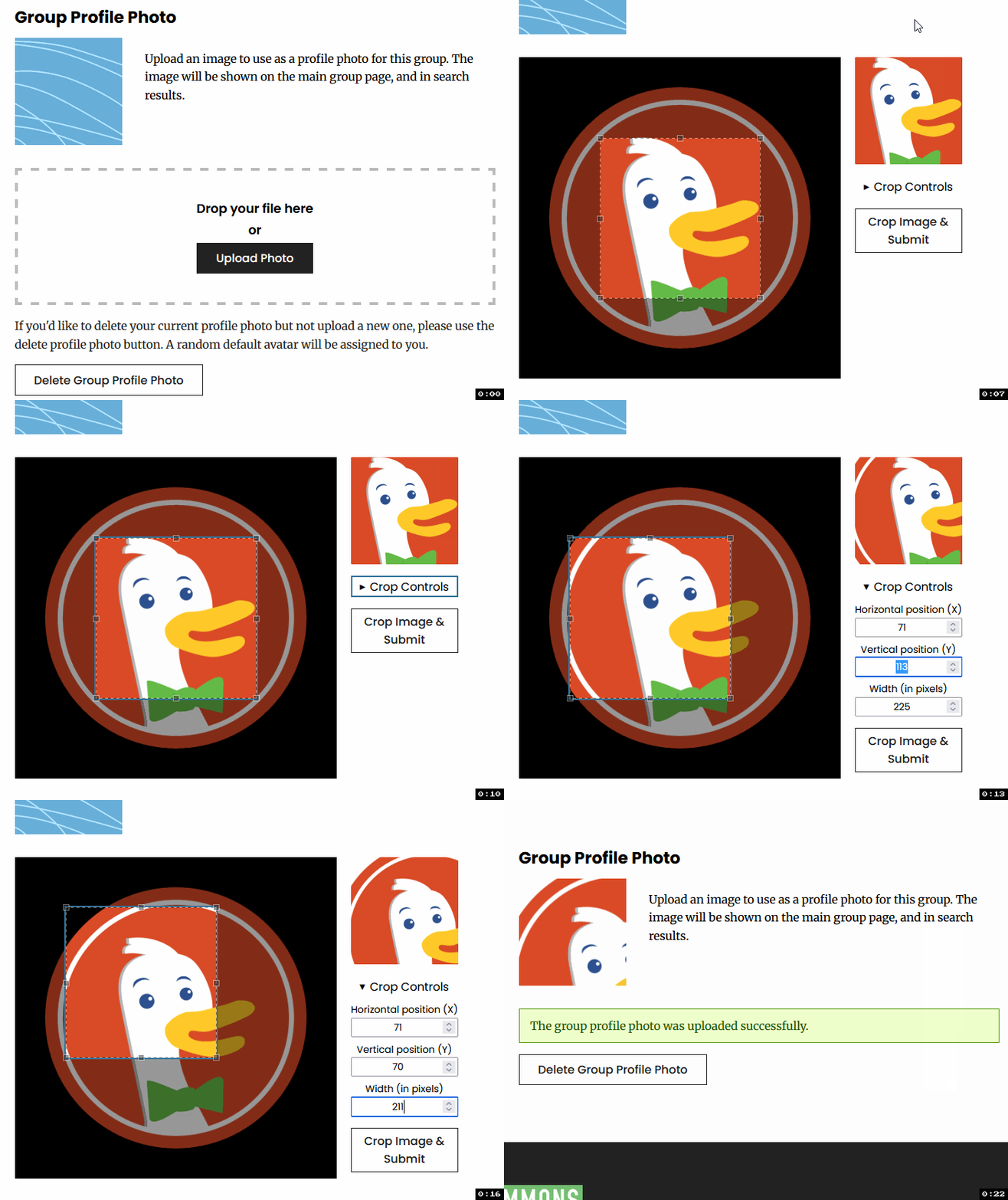
Avatar cropper selection window only supports mouse-dragging motion to move selection and not single-pointer move adjustments (510209-01)
The JCrop JS library, which handles the photo cropping functionality after upload, does not support single-pointer movement. An alternative is to add new input fields to the upload screen so keyboard users can adjust the x and y coordinates of the cropper, as well as the width and height. These keyboard options would placate the need to address JCrop's lack of support for single-pointer movement. If we implemented this, I think it would be best to hide these controls unless they are toggled by the user.
Update - I've added a first pass at adding a 'Crop Controls' section to the avatar crop screen in https://github.com/cuny-academic-commons/cac/commit/e1b3438. This is available for testing on CDEV. See GIF below:
CV Editor items (see #25420, #25421)
Boone, other than the items above, can you take a look at the remaining list? These should be rather easy to address. Let me know if you want to pass any items my way.
Updated by Boone Gorges 2 months ago
Thanks, Ray! I've worked through a number of items on the list. I think we may be close to the point where we can begin responding to Vispero. Let's strategize on today's call.
Updated by Raymond Hoh 2 months ago
I've made an initial list of things we can ask Vispero:
Questions after initial report:- Forum thread title heading - 510146-07
- Focus after uploading photo - 510157-03
- User-generated content in forum post (ask to ignore?) - 510188-02
- Event calendar content is cut-off when zoomed in at 400% - 510201-02
- Avatar cropper selection aria role - 510206-01
- Avatar cropper selection only supports mouse-dragging motion to move selection and not single-pointer move adjustments - 510209-01
- Admin bar disclosure links with aria button role - 510156-03, 510156-04
- CV Editor items - 510186-01, 510188-01
- Event calendar output uses nested table markup (work on this in a future release?) - 510228-02
Boone, feel free to make any adjustments or to add anything that I missed.
Updated by Boone Gorges about 2 months ago
Thanks for this, Ray. I've looked over the document and over your list and I think it's good.
Regarding communication with Vispero, here's what I'm thinking:
- 510146-07 (forum thread headings) Could you draft something here? I guess your comment in the document pretty much says it all.
- 510157-03 (focus during group avatar upload) - I think I did reproduce this. The weird thing is that, immediately after upload, focus is on the body element; but then if you hit Tab once, you end up on the Crop Controls element. I think this has something to do with a race condition between the focus-setting event and the new elements' being created. I wrapped the whole thing in a requestAnimationFrame callback so that we'd be sure that it fires after the onload is complete: https://github.com/cuny-academic-commons/cac/commit/afbaaeea845beb08ba89c7f0b6378d09ec12a3bc This seems to fix it, and ensures that that we set focus to the 'Crop Controls', which feels like the right place after upload. I pushed this to production for easier testing. If it looks ok, I think we can skip having a conversation about it.
- 510188-02 (user-generated content) - Maybe we can say something like this: "The problematic markup here is user-generated. We offer WYSIWYG tools that allow and encourage users to use semantic list markup, but in this specific case, the user didn't utilize these tools - instead, they manually used em-dashes and other formatting that mimicked it. There's not much that our platform can do to prevent this sort of behavior, but we do think it's a corner case at best, since the user went quite out of their way to produce this "incorrect" markup. Perhaps there's a way for us to disregard items like this?"
I know that you did a ton of work to bring the admin bar markup in line with the Disclosure pattern. Do you feel like we're close enough here that we should just go ahead and let them test it and see what they have to say? I feel like there's a lot that I could say about upstream packages, the history of WordPress, etc :) but it's not worth doing this if you think we're close enough that we might pass their checks. I personally feel like we're probably fine to say nothing about it and just see how the next round of testing goes, but I wanted to bring it up.
Updated by Matt Gold about 2 months ago
Hi both -- for - 510188-02 (user-generated content), can we have them check a different page/site/group/whatever? I know that for Manifold, we have them check specific demo sites that we've set up where we can be sure there aren't user errors that would affect the VPAT
Updated by Raymond Hoh about 2 months ago
- 510146-07 (forum thread headings) Could you draft something here?
Yeah, the comments in the Google Sheet are what I would mention to Vispero.
- 510157-03 (focus during group avatar upload) - I think I did reproduce this.
Vispero's report was made before the recent additions to focus the crop selection window and to add a "Crop Controls" toggle. The Crop Controls toggle and input fields were the most recent addition to address 510209-01, so if it makes more sense to focus the Crop Controls toggle after the photo is uploaded instead of the crop selection window, then let's stick with that instead.
Do you feel like we're close enough here that we should just go ahead and let them test it and see what they have to say? I feel like there's a lot that I could say about upstream packages, the history of WordPress, etc :) but it's not worth doing this if you think we're close enough that we might pass their checks.
Agreed. I think we can give Vispero a spiel on WordPress if there are additional concerns after the next round of testing that cannot be resolved with some small javascript modifications. What we could consider is adding a click handler on the toggle links (like My Groups) to prevent the clickthrough link from occurring or by nullifying the href value for these toggle links since we're now using role="button" for these top-level items. We'll see what Vispero says.
Event calendar output uses nested table markup (work on this in a future release?) - 510228-02
We should probably create a new ticket for this, but did we want to look into upgrading Event Organiser's fullCalendar JS for this accessibility audit? Boone, since you've worked more with Event Organiser and the fullCalendar JS library, I wanted to know your thoughts here. There are a bunch of customizations we've made, especially in bp-event-organiser and to bp-nelo that we'd want to ensure are still working. I can add a new branch with my test code so you can take a look.
Hi both -- for - 510188-02 (user-generated content), can we have them check a different page/site/group/whatever?
510188-02 is specific to forum posts, though there are other places where users can generate content: Public CV, Group Library Docs, Events.
Updated by Boone Gorges about 2 months ago
Hi Ray - Sorry for the delay on my end. I spent some time today looking at fullCalendar and how it's implemented in event-calendar. It seems like upgrading to the new fullCalendar is going to be a large lift, both because of our own customizations but also because we don't control event-organiser itself. So we'd have to shoehorn everything externally, which adds a level of complexity. Even if we were to fork (or send a PR to) event-organiser, it's not clear to me that fullcalendar is such a great option from an a11y point of view that all the effort is worth it.
I guess I would be interested to see some of the proof-of-concept work you did on the upgrade. Maybe I'm overestimating the amount of work it would take to get something put together that's genuinely useful, and not too much of a house of cards moving forward.
Thinking about the VPAT, I wonder if we can do something more focused and modest. Since the calendar/grid view is currently not very semantic or even usable for screen readers, we could consider removing it from the accessibility tree altogether (aria-hidden), and making it a visual-only progressive enhancement. The list view becomes the only way to view event content with screen readers. This obviously is not ideal, but it allows us to skirt the problem. What do you think?
Updated by Boone Gorges about 1 month ago
I left a comment on the Vispero ARC platform asking about specifying URLs to avoid problematic user-generated content on the next pass (https://arc.vispero.com/Account/3d3528ea-14bb-4bb8-bd12-dc806876d951/AuditDashboard/Source/bedfe15b-d200-4e15-a59d-2857e18d2765/JobSession/03c38bf3-e730-4f11-b3c2-41b5def90555/Finding/8e8e71cb-4760-4db1-9036-4c8eb446000d)
Ray, I was going to go ahead and leave something for 510146-07 but I couldn't figure out how you wanted it phrased. Could you do it? https://arc.vispero.com/Account/3d3528ea-14bb-4bb8-bd12-dc806876d951/AuditDashboard/Source/bedfe15b-d200-4e15-a59d-2857e18d2765/JobSession/03c38bf3-e730-4f11-b3c2-41b5def90555/Finding/1fb3d620-bf15-40ef-9db6-f3e708167798
Updated by Raymond Hoh about 1 month ago
Boone, I've left a comment for instance ID 510146-07 in the Arc Vispero platform. It looks like this creates a Zendesk ticket.
Update: Vispero agreed with my recommendation. I've implemented the change in https://github.com/cuny-academic-commons/cac/commit/6f215843ba.
I tried to view your comment for instance ID 510188-02, but it looks like the thread is not available within the Arc Vispero platform.